Permissions Prompting: A Deep Dive
My name is Oliver Calder and I am part of the Snapd team at Canonical. In this post, I'm excited to share some more information about a project I've been working on over several years with a talented group of people across the AppArmor, Desktop, Design, and Snapd teams: Permissions Prompting.
Permissions Prompting is a new layer of user-defined security which empowers users to control at runtime the level of access applications have to the host system.
There was an excellent post from around the 24.10 cycle which introduced Permissions Prompting. Since then, we've made many improvements across the stack, and we're excited to ship Prompting in an Ubuntu LTS release for the first time with the newly-released 26.04 Resolute Raccoon. While still in an experimental state, we're looking forward to gathering feedback from new users as we continue to add functionality and refinement over the coming cycles.
In this new post, I want to share some more details about the motivations, design, and implementation of Permissions Prompting.
Intro to AppArmor and Snap Interfaces
Before digging into the details of Permissions Prompting, I want to give some background about the existing security systems on which Permissions Prompting builds.
Ubuntu and several other Linux distributions use a Linux Security Module called AppArmor to mediate application permissions. In short, each application which is confined by AppArmor has a profile containing rules which explicitly enumerate the files, networking, and other permissions to which the application has access. If there is no rule allowing a particular operation, AppArmor intercepts and blocks that operation at runtime.
AppArmor profiles are a key piece of security for snaps (and increasingly, classic .deb packages on Ubuntu as well). By default, snaps have access to their own sandbox and a minimal set of system resources from the host system. However, many applications need broader permissions in order to function as intended, such as a photo editor accessing files in the user's home folder or a streaming client communicating over the network.
When someone creates a snap, they can use snap interfaces to specify the permissions required by their application. Snapd then uses these interface definitions to add additional rules into the snap's AppArmor profile, thus granting those permissions.
Why Prompt?
Most Snap interfaces provide fine-grained control over a particular category of system access, like access to cameras or a particular block device. However, some interfaces grant broader permissions in order to ensure compatibility between the application and the user's individual setup.
The archetypal example of this is the home interface, which grants access to most files and folders in the user's home directory. This interface is used by many applications such as office suites, photo editors, and music players, allowing the user to work with whatever files they need, regardless of how they choose to organize their home directory.
The purpose of Permissions Prompting is to provide the user with an extra level of control and peace of mind about the permissions of applications running on their system. For particular interfaces, if an application tries to access a resource allowed by that interface, rather than automatically allowing that access, the user is instead presented with a prompt describing the access attempt and asking whether they would like to allow or deny that access.
As a user, you thus have the ability to audit what applications are trying to do and control what and when they may access. If a video editor attempts to read a .mp4 file in your Videos folder, you can reply and by allowing that application to always have access to files in your Videos folder. If you're using a video call application, you can grant it access to your camera for the rest of your session, and you will get another prompt if it tries to access your camera again in the future. If a chat app starts snooping around your Documents folder, you can block that access for now or forever — and have the chance to think about whether it's really something you want to keep on your system.
Architecture of Permissions Prompting
There are three main pieces of software which work together to provide Permissions Prompting.
The first is AppArmor, which runs in the kernel and is responsible for intercepting applications' attempts to access the system and matching them against AppArmor rules in the application's profile. When prompting is enabled, snapd adds a prompt prefix to certain allow rules in applications' profiles. When an application performs an operation which matches one of those rules, then instead of immediately allowing the operation to proceed, AppArmor creates a request and sends it to the second component: snapd.
Snapd receives the request from AppArmor and first checks whether there is an existing prompting rule (not the same as an AppArmor rule) which applies to the request. Rules can be created either as the result of a reply to a prompt or added directly by the user. If an existing rule matches the request, then snapd automatically sends back a response to the kernel. If there is no rule which applies, then snapd creates a prompt and notifies the prompting client.
The prompting client is the third piece of the prompting system. When it receives the notice from snapd that there is a new prompt, it retrieves the prompt via the snapd REST API. It then opens a dialog box presenting the user with a description of the request and various options for how they wish to handle it.
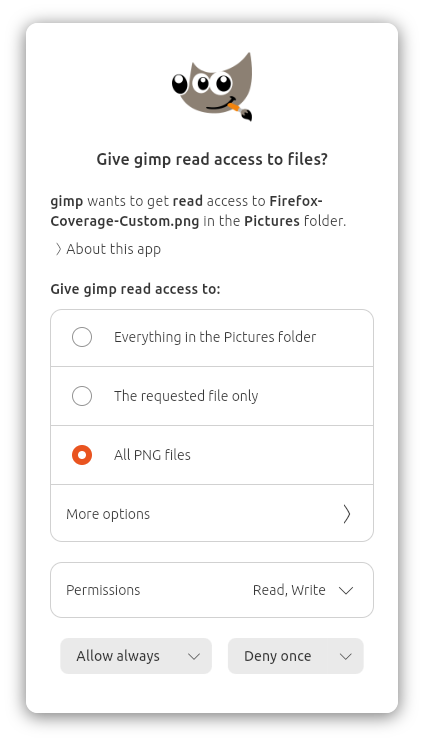
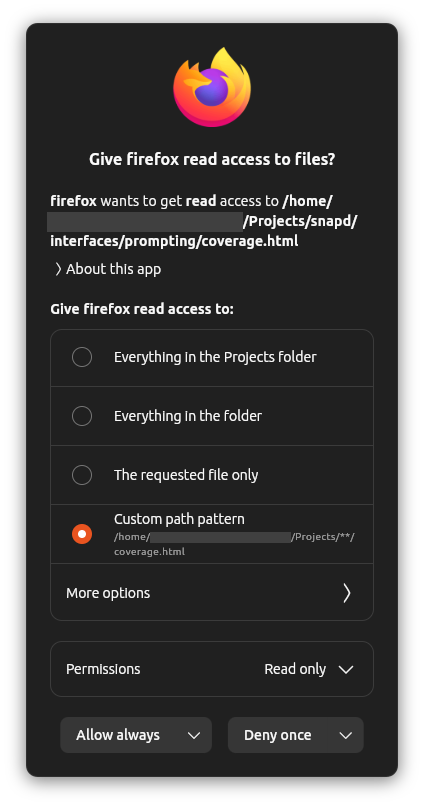
The user selects whether they want to allow or deny the request, the particular permissions they wish to allow or deny, how long they want that decision to apply, and (for some interfaces) the specific path(s) for which the decision should apply.
The prompting client then sends the reply back to snapd. If the user selected a reply duration other than “once”, then snapd creates a new rule which it will use to match against future requests. Next, snapd sends a response back to AppArmor. Lastly, AppArmor receives the response and either allows or denies the pending operation, and the application carries on.
Portals and Permissions Prompting
I can hear some of you asking already: doesn't this sound a lot like Portals? In some ways, yes. We want to give users the same level of control available via Portals even when their applications were not developed to use Portals. The primary goal of prompting is to respect user intent while raising the bar for security across all applications.
XDG Desktop Portals provide standardized APIs which applications can use to request various actions on the host system. For example, they can open a file picker using the native toolkit of your desktop environment, or present a window chooser pop-up when an application requests to share your screen.
When an application uses a portal, the user explicitly chooses what they would like the application to do, so their intent is clear and they remain in control. Access via portals is proxied by the portal backend and does not hit the usual interface-specific AppArmor rules associated with Permissions Prompting. Thus, users should not be presented with Permissions Prompting prompts for actions taken via portals.
For applications which do not use portals, that's where Permissions Prompting comes in. Many applications still do not use portals, or only use portals for particular actions. Portals require specific API calls within the application, so the developer must explicitly program their application to use them.
Permissions Prompting is designed to be a universal system which works for all applications without any action required from the developer. We want users to have greater control over the applications running on their system, regardless of how those applications were developed.
How Far Have We Come, What's New in 26.04?
Permissions Prompting was first launched as an experimental feature in Ubuntu since 24.10. The initial implementation focused on the home interface, which enables the user to have granular control over the files and directories they would like each application to be able to access.
In 25.04, we made lots of UX improvements, including making rules idempotent and intent-based, merging rules with the same path pattern and supporting different outcomes and lifespans for each permission within a given rule, caching snap icons locally to be displayed in prompts without network requests to the store, and persisting outstanding prompts across snapd restarts by reclaiming requests from AppArmor after snapd restarts.
In 25.10, we added better integration between prompts, the application windows, and the desktop shell, we improved the default prompt responses and reduced repeated prompts, we added the ability to create rules and reply with decisions which last until the user logs out, and we extended prompting to include the camera interface, which required huge refactors and generalizations throughout the stack to now support multiple interfaces with different prompt and rule contents and semantics.
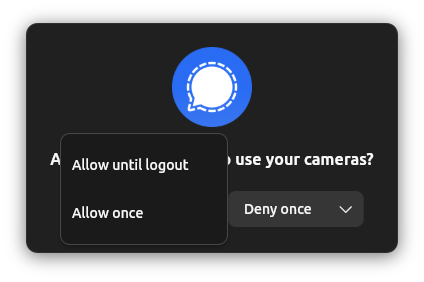
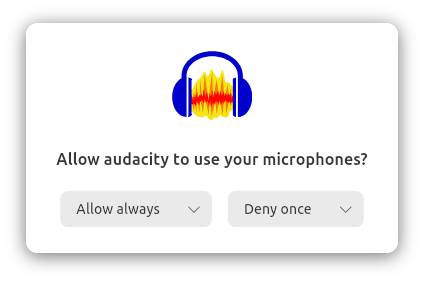
With 26.04, we're shipping a beautifully-redesigned Prompting Client UI, further refinement of the UX of replying “Allow/Deny Once” thanks to new AppArmor features, and support for the audio-record interface. Unlike home and camera, the audio-record interface is a marker interface which does not define AppArmor rules but is instead checked directly by WirePlumber when an application tries to use an audio stream. Adding prompting support for audio-record involved some clever changes within WirePlumber itself to ensure a seamless connection flow while querying the snapd API to ask whether that application should be allowed access to the microphone. On the snapd side, we added that new API endpoint and now handle incoming requests from both AppArmor and the API in parallel, all while maintaining the same resilience guarantees and UX consistency as before. And of course, the Design and Desktop teams crafted the UI for microphone prompting in the Prompting Client and Security Center.
How Do I Use It?
Permissions Prompting is available now on Ubuntu 26.04 LTS! Additionally, thanks to the portable nature of snaps, prompting and most of the features discussed above are available on all Ubuntu releases going back to 24.04.
To use it, please ensure you have the following snaps installed (these should be preinstalled on Ubuntu 24.10 and later):
desktop-security-center— this manages Permissions Prompting and TPM-backed full-disk encryptionprompting-client— this is responsible for listening for and presenting prompts to the user and communicating with snapd
To enable prompting, open the Security Center application and click the toggle in the App Permissions panel labeled “Require apps to ask for system permissions”.
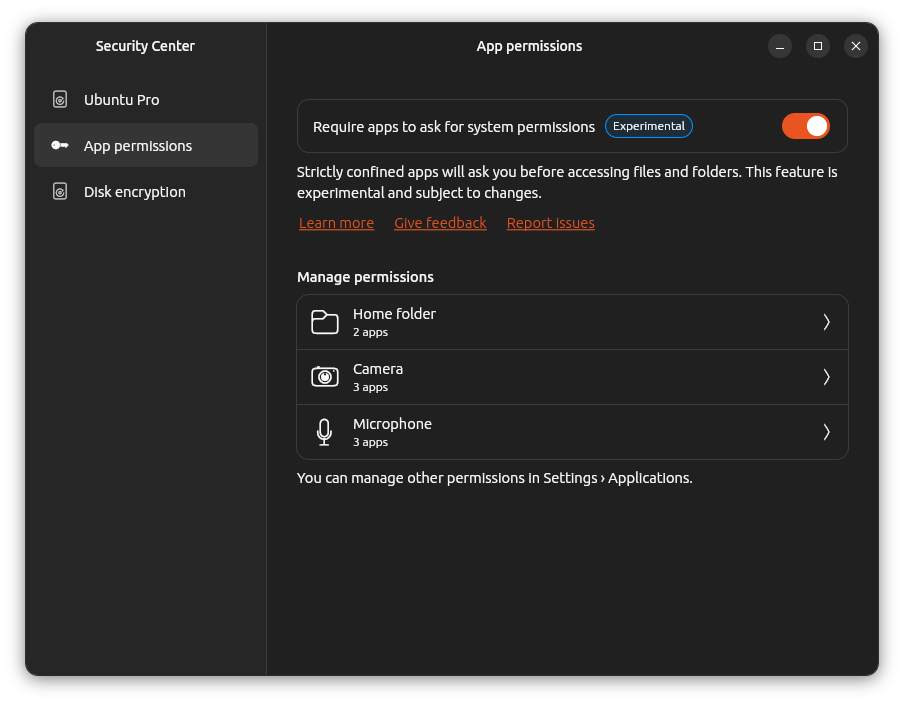
Then, log out and log back in again (so WirePlumber knows to ask for microphone access) and you're ready to give prompting a try!
We welcome any feedback you have for us as we continue to improve and evolve Permissions Prompting. Please feel free to share your experience with us using the following links:
In Conclusion
This post has covered a lot of ground! Thanks for sticking around :)
To summarize, I first introduced AppArmor and snap interfaces and discussed the motivations for adding Permissions Prompting on top of those existing systems. I then presented an overview of how prompting works and how it relates to XDG Desktop Portals. Finally, I discussed the progress we've made, what's available now in Ubuntu 26.04 LTS, and how you can try out prompting today.
I'm already planning a follow-up blog post going into even deeper detail on some topics related to Permissions Prompting, in particular the communication flows between AppArmor and snapd and between snapd and the prompting client, 3rd party prompting clients, how audio-record prompting works under the hood, the logic for matching prompts against rules, and how prompting for arbitrary (potentially non-snap) applications might work. If you have any questions about Prompting, I'd love for you to send them my way and I'll do my best to answer them as well.
As I said above, the goal of Permissions Prompting is to give users even greater control over their systems, raising the bar for security and user privacy for all applications. This is one of many initiatives we're undertaking to drive forward the Linux Desktop and shape the future of Ubuntu, and I hope you'll join us for the ride. Thank you for your time, and I'll see you in the next one.